


Quick Verdict
Make (formerly Integromat) is one of the most powerful no-code automation platforms available today. It allows businesses, marketers, and creators to connect thousands of apps and automate complex workflows without writing code.
Compared to competitors like Zapier and n8n, Make stands out with its visual workflow builder, advanced logic capabilities, and competitive pricing.
Overall Rating: 9.3/10
Pros
-
Intuitive drag-and-drop workflow builder
-
Supports complex multi-step automations
-
More affordable than Zapier for many use cases
-
Large library of integrations
-
Powerful data transformation tools
-
Generous free plan
Cons
-
Learning curve for beginners
-
Complex scenarios can become difficult to manage
-
Limited debugging compared to developer-focused tools
-
Some advanced integrations require paid plans
What Is Make?
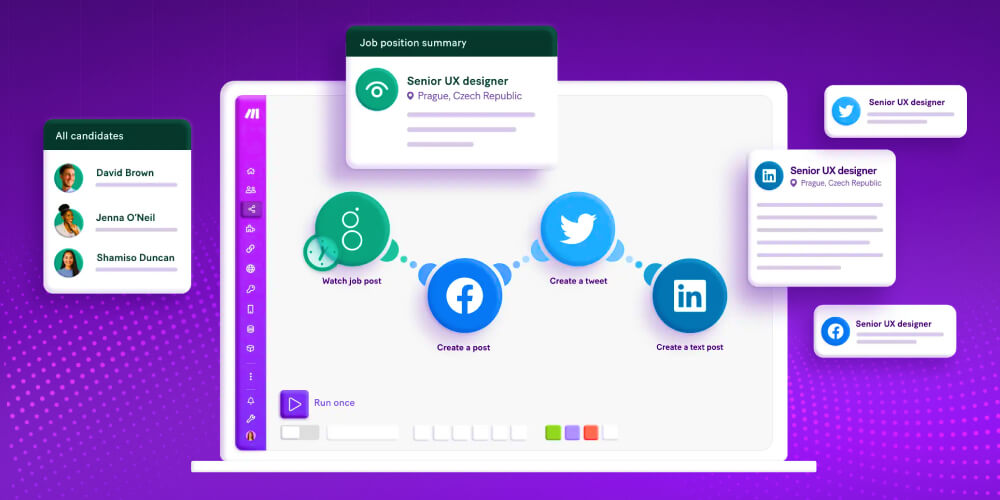
Make is a cloud-based automation platform that enables users to connect applications and automate repetitive tasks through visual workflows known as “Scenarios.”
The platform supports thousands of integrations, including:
-
Google Sheets
-
Gmail
-
Slack
-
WordPress
-
HubSpot
-
Airtable
-
OpenAI
-
Shopify
-
Notion
-
Trello
Instead of manually moving data between apps, Make automatically performs these actions based on triggers and predefined logic.
For example, you can automatically:
-
Publish blog posts to social media
-
Send leads from forms to a CRM
-
Generate AI content using ChatGPT
-
Update spreadsheets from multiple sources
-
Create automated reporting dashboards
Key Features
1. Visual Workflow Builder
Make’s biggest advantage is its visual automation editor.
Unlike traditional automation tools that rely on simple step-by-step sequences, Make provides a flowchart-style interface that allows users to visualize every action within a workflow.
Benefits include:
-
Easier workflow management
-
Better visibility into automation logic
-
Support for branching conditions
-
Advanced routing capabilities
This makes Make particularly attractive for users building complex automations.
2. Thousands of App Integrations
Make connects with more than 2,000 applications and services.
Popular integrations include:
-
WordPress
-
OpenAI
-
Google Workspace
-
Facebook Pages
-
LinkedIn
-
X (Twitter)
-
Shopify
-
Stripe
-
Mailchimp
-
ActiveCampaign
For applications without native integrations, users can connect APIs through HTTP modules.
3. AI Automation
Make has become increasingly popular among AI marketers and content creators.
Popular AI workflows include:
-
AI blog generation
-
Social media content creation
-
Lead qualification
-
Customer support automation
-
AI-powered research
Users can connect OpenAI, Claude, Gemini, and other AI platforms into a single automated workflow.
4. Advanced Logic & Routing
Unlike many beginner automation tools, Make supports:
-
Conditional paths
-
Routers
-
Filters
-
Iterators
-
Aggregators
-
Data transformation
These features enable highly sophisticated business automations without requiring programming skills.
5. WordPress Automation
For bloggers and affiliate marketers, Make offers powerful WordPress integrations.
Common use cases include:
-
Automatically publishing blog posts
-
Scheduling content distribution
-
Posting articles to LinkedIn and X
-
Updating SEO spreadsheets
-
Managing affiliate content workflows
This makes Make particularly useful for content-driven websites.
Ease of Use
Make is easier to learn than traditional coding solutions but slightly more complex than Zapier.
Beginners can build simple automations quickly, while advanced users can create highly sophisticated workflows.
Ease of Use Score: 8.8/10
Pricing
Make offers one of the strongest free plans in the automation industry.
Free Plan
Includes:
-
Up to 1,000 operations per month
-
Unlimited scenarios
-
Access to most integrations
Paid Plans
Plans scale based on:
-
Number of operations
-
Workflow complexity
-
Team collaboration requirements
Compared with Zapier, Make often delivers significantly more automation capacity for the same budget.
Make vs Competitors
Make vs Zapier
Choose Make if:
-
You need complex automations.
-
You want better pricing.
-
You prefer visual workflows.
Choose Zapier if:
-
You want the simplest setup experience.
-
Your workflows are relatively straightforward.
Make vs n8n
Choose Make if:
-
You prefer a fully managed cloud platform.
-
You want faster deployment.
-
You don’t want to manage servers.
Choose n8n if:
-
You need self-hosting.
-
You require maximum customization.
-
You have technical knowledge.
Make vs Pabbly Connect
Choose Make if:
-
Workflow flexibility is important.
-
You need advanced routing and logic.
Choose Pabbly if:
-
You want lifetime deal pricing.
-
Your automation requirements are relatively simple.
Real-World Use Cases
Affiliate Marketing
-
Publish reviews automatically
-
Update tracking spreadsheets
-
Distribute content to social channels
SaaS Marketing
-
Lead capture automation
-
CRM synchronization
-
Customer onboarding workflows
Ecommerce
-
Order processing
-
Inventory updates
-
Customer notifications
Content Marketing
-
AI content generation
-
Blog publishing
-
Social media scheduling
Who Should Use Make?
Best For
-
Affiliate marketers
-
Bloggers
-
SaaS businesses
-
Marketing agencies
-
Ecommerce stores
-
No-code enthusiasts
-
Content creators
Not Ideal For
-
Users who only need basic automation
-
Organizations requiring on-premise deployments
-
Teams needing extensive developer tooling
Customer Feedback
Users consistently praise:
-
Powerful workflow builder
-
Affordable pricing
-
Visual interface
-
Advanced automation features
The most common criticism is the learning curve associated with building complex scenarios, especially for users new to automation platforms.
Final Verdict
Make is one of the most capable no-code automation platforms available today. It strikes an excellent balance between power, flexibility, and affordability.
For marketers, affiliate website owners, agencies, and businesses looking to automate workflows without coding, Make offers exceptional value and scalability.
If you want more flexibility than Zapier but less technical complexity than n8n, Make is arguably one of the best choices on the market.
Final Score
| Category | Score |
|---|---|
| Ease of Use | 8.8/10 |
| Integrations | 9.5/10 |
| Automation Features | 9.8/10 |
| Pricing | 9.2/10 |
| Value for Money | 9.4/10 |
| Overall | 9.3/10 |
Recommended For: Bloggers, affiliate marketers, agencies, SaaS companies, and businesses looking to automate workflows efficiently without coding.